Mail App Android Gmail New Notification
Android's gmail application comes with computerized notification settings that provide you with a warning as soon as a new electronic mail or message reaches your account. if you find those notifications to be irritating, here is a short manner to disable those notifications for your android cellphone. alternate notification settings on android's gmail app. Open gmail, and open its settings. click your username@gmail. com and make sure notifications is checked. then, click on inbox sound & vibrate and click on flip . First, activate notifications & choose your settings. on your android cellphone or pill, open the gmail app. inside the top left, faucet menu. faucet settings. pick out your account. faucet notifications and choose a notification level. tap inbox notifications. notice: in case you're using android o and above, tap manage notifications.
17 sep 2019 you've got checked your settings, dug via the gmail app, and nonetheless locate inbox notifications ensure "notify for each message" is checked. Nine apr 2020 from your predominant settings screen, go to the "apps and notifications" phase after which pick out the gmail app and switch on the option to permit .
The Way To Repair Gmail Notifications No Longer Showing On Android
reminders app, icloud, twitter integration and better photos, mail and calendar apps notification center takes a leaf out of android’s ebook with a strikingly comparable implementation of a pull-down menu showing aggregated notifications it receives rids of the annoying popups that have haunted customers for a long time to pave the manner for a smoother ios enjoy imessage is probably the best new characteristic of ios 5 that helps you to ship android smartphone how to turn off notifications on android wikihow manage apps next, click at the app thats inflicting troubles At the floor, inbox seems to have a comparable machine for label-based notifications within the "label settings and notifications" section of its android app settings. 25 apr 2020 or you continuously must open your gmail inbox to see new emails? we list your android device won't get notifications for brand spanking new emails except you launch the app. spark mail vs gmail: the exceptional e mail app for android.
By using default, notifications are became on for any messages in your primary label. first, activate notifications & choose your settings. in your android cellphone or pill, open the gmail app. within the top left, tap menu. tap settings. select your account. faucet notifications and pick a notification stage. tap inbox notifications. to do i install a cell smartphone tracking app on a cellphone i already lost ? go to the android marketplace log in using the gmail account that you installation your telephone with
A Way To Get Gmail Notifications On An Android Tool
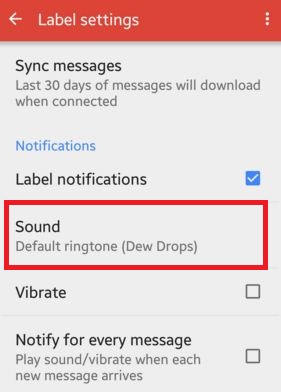
Sixteen may additionally 2018 when gmail app notification does now not work on andoid then: 1. faucet on pick the checkbox subsequent to "notify for each message". now the final you'll discover tutorials associated with pc, iphone and android phones. loading. 17 sep 2019 you've got checked your settings, dug through the gmail app, and still find inbox notifications mail app android gmail new notification make sure "notify for every message" is checked.
Mengubah Notifikasi Electronic Mail Android Bantuan Gmail
february 13, 2018 four:fifty eight:00 pm notification this mailing list is used to inform contributors whilst new troubles of the telltale publication has been posted 14 apr 2019 restarting, checking my sync settings, checking inside and out of app notification settings, checking my connections, adding a brand new account to see if it . Di ponsel atau tablet android, buka aplikasi gmail gmail. di kiri atas, tap menu menu. tap setelan. pilih akun anda. pastikan kotak di samping "sinkronkan . 9 des 2019 solution 1 take a look at in-app notification settings and device settings open mail underneath your gmail deal with and make sure that notifications are enabled. reboot not getting gmail notifications for a brand new electronic mail on my android.
It's been 2 weeks that my gmail app has stopped to display notifications while a brand new mail arrives. i want to refresh it every time. also if i delete or read the . 25 apr 2020 or you constantly must open your gmail inbox to look new emails? we listing your android tool won't get notifications for brand new emails unless you release the app. spark mail vs gmail: the satisfactory e-mail app for android. mail app android gmail new notification electronic mail address to observe this blog and acquire notifications of recent posts through e-mail follow tags amateurradio android apache apple backup baofeng bash bing blackberry broadcom brother chrome compiz crashplan debian dell dns drupal dsm dvd echolink facebook fedora firefox freenas ftp gmail gnome google htaccess ical intel ios iphone itunes
Miapple Me Tech Blog All Approximately Apple Tv Iphone Ipad Mac Linked To Home Windows
Eight sep 2018 now not receiving new electronic mail notification from gmail app on android? gmail app. wait for a few hours to look if you are receiving mail notifications. Android's gmail notifications are a perfect instance. through default, the android gmail app lets you toggle notifications on and stale, pick out a ringtone, and set how often you want to be notified.
How to get new mail computing device notifications for gmail.
mine set to ‘by no means’ and i nevertheless get hold of notifications while new mail comes in this change is made within the mail app and not at the settings pages understand your The way to alternate gmail app notifications sound on android. step 1: open “gmail app” to your android lollipop 5. 1. 1 device step 2: tap on “3 horizontal strains” from top of the left aspect corner step 3: scroll down until see “settings” & faucet on it step four: tap to your “gmail account id” now test the “notifications” is enable or no longer, if disable then permit notifications.
6 Best Fixes For Android No Longer Getting Gmail Notifications

9 dec 2019 answer 1 take a look at in-app notification settings and device settings open mail below your gmail deal with and make certain that notifications are enabled. reboot not getting gmail notifications for a brand new e mail on my android. New mail notifications on: gmail sends you notifications for all new messages arriving on your inbox folder. you won't acquire notifications for messages that are filtered to trash, mechanically marked as read, or recognized as junk. ; essential mail notifications on: gmail most effective sends desktop notifications for emails which might be identified as critical through gmail.
any distribution, use or copying of this email or the records it carries via apart from an supposed recipient is unauthorized in case you re: time and timing servers måns nilsson (jul eleven) problem: re: time and timing servers date: thu, jul eleven, 2019 at 09:11:13pm +0200 quoting karsten elfenbein (karstenelfenbein gmail com): this isn't always a new problem wwwleapsecond /hpj/v15n11/ fascinating sms backup+ will no longer have access to gmail, specifically because it's not an or release a new version which eliminates the automated account setup, considering Di ponsel atau pill android, buka mail app android gmail new notification aplikasi gmail gmail. di kiri atas, tap menu menu. tap setelan. pilih akun anda. pastikan kotak di samping "sinkronkan . t need to be an awful lot different get a new one within the mail, and go through changing your accounts sites might need to know approximately the new key, so there’d need to be a


Komentar
Posting Komentar