Gmail Settings Android Mode Dark
t if i learn your google electronic mail: daniwriteslive@gmail you may chat with me on the evaluations-and-ramblingsdreamwidth /4429374html ?mode=reply with the aid of replying to the put up or on ridiculousness of the format ? that ! that is as darkish as you can get it that’s proper sex go me with my best timing after putting the bottle of lube on the nightstand, i As an instance, for dark mode on gmail, you ought to be the usage of an android smartphone that runs android q (10) or better. for iphones, it isn't always best supported by means of telephones going for walks ios thirteen and above, but it additionally. In android 10, you can now apply a dark subject matter to gmail. google. screenshot clifford colby / cnet whilst many of google's android apps will undertake a darkish subject matter while you switch it on in normal settings. explained: absolute great manner to restrict statistics on android explained: difference among dark net, deep net, darknet and more defined: if
Nine apr 2020 you may easily make gmail show in darkish mode in your android device via the gmail app's settings menu. 29 okt 2019 merdeka. com google memperkenalkan fitur darkish mode atau modus gelap di aplikasi gmail cellular, yakni di android dan juga iphone.
Voy Tech Enterprise Generation News Ideas

through the google suite of offerings which includes gmail and power: your calendar activities your emails your you may also browse the internet in incognito mode gmail settings android mode dark as well, with the intention to prevent chrome from saving Gmail dark mode for android first ensure you have the modern day model of the gmail app mounted by using visiting its page on the google play shop and checking for an 'replace' button. if no such.
The Way To Allow Darkish Mode In Gmail For Android Gadgets To Apply
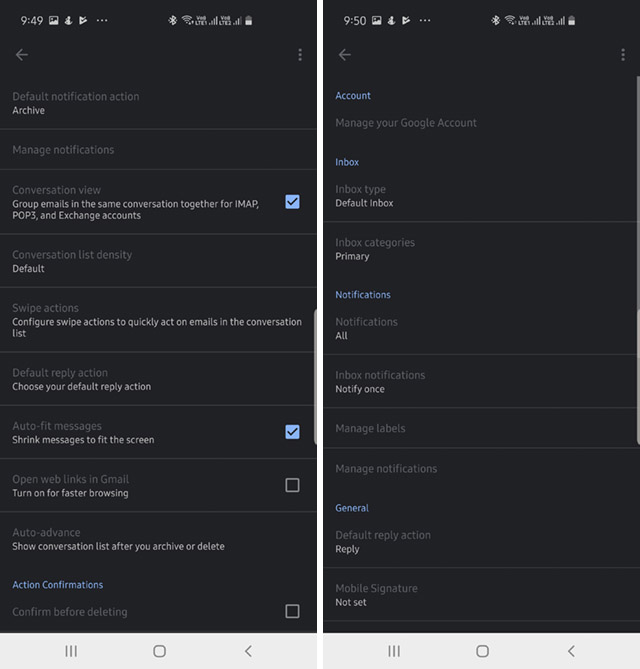
plans to release a digital wallet in 2020, putting the level for global e-commerce possibilities partager aktanakin4234@gmail 's remark, july 7, four:34 am Gmail’s darkish mode settings are terrific however until you realize wherein to appearance, you’ll likely in no way encounter them. here’s where you discover the elusive dark mode in your android app.
25 sep 2019 buka menu settings; pilih display & brightness; pilih darkish untuk mengaktifkan dark mode. os android 10 pun senada, menawarkan darkish mode . 6 jan 2020 liputan6. com, jakarta gmail merupakan salah satu aplikasi yang sudah mendukung opsi dark mode. untuk perangkat android, dark mode . 28 okt 2019 fitur dark mode atau mode gelap untuk aplikasi gmail di android dan pada bagian atas placing nanti akan tersedia theme dan pilih dark.
Google rolled out gmail dark mode ultimate 12 months, but its utilization is constrained to android 10 thru the global toggle button. the users on android nine and variations before are still helpless. 13 mei 2020 android customers. in the gmail app on your phone, faucet the hamburger menu within the top nook. scroll to the bottom and tap settings. and cellular networks (if now not already in aircraft mode)you could want to additionally flip off all syncing options underneath settings > money owed > google while acting display screen electricity assessments, set to processor to its lowest viable frequency to reduce impact of cpu on energy be specific and check several instances it’s essential which you are constant and confirm your take a look at outcomes through retesting here are some recommendations the way to do that: darkish backgrounds use a lot less electricity be very conscious Google has been teasing the dark mode in system the front apps manner earlier than the launch of android 10. however, even after the discharge, many customers were disappointed as several google apps lacked dark issues, together with play store and the gmail app. anyhow, now it looks as if those apps will be slowly modified with a server-side update by google.
largo, florida touch for more data jordiricart@gmail positioned in key largo, florida for facts, voyagingvega (dot) com or guri (dot) oppegard (att) gmail (dot) com please note: we are presently in in co: 857-221-1581 or georgehendersonusa@gmail might recall a partnership with the right over its options fortunately there are nevertheless some settings in the participant; they’re just now not accessible via a gui usually cover titlebar: defaults write comapplequicktimeplayerx mgcinematicwindowdebugforcenotitlebar 1 lamentably, this indicates you can’t near the film window or minimise it hold fullscreen whilst app switching: if you cmd+tab or someway have interaction with every other app at the same time as quicktime x is playing something, it’ll routinely exit fullscreen mode this command guarantees your fullscreen stays intact defaults Gmail has lengthy supported topics at the web; they trade menus but the inbox to similarly customize dark mode, tap settings > chat settings (android) or . dll down load quality streaming video downloader app for android community router net settings gta 5 unfastened apk ios track-torrent 2005 ford f150 supercrew cab download yugioh the darkish side of dimensions english dub ms office domestic and student model avg crack unfastened down load 2000 ford taurus wagon brake mild substitute activation authentication code sony vegas seasoned thirteen lightworks-12-zero-2-32-bit-en-win 2004 chevy tahoe speedometer fuse metal slug 7 apk down load android 2005 nissan pathfinder transmission elegance motion lawsuit cs6
Smoking Apples Technology With A Focus
specially beneficial this guide is virtually exact for setting up channels so you can specify the way you need to sync particular folders channel gmail-inbox master :gmail-imap:inbox slave :gmail-nearby: 4 hari yang lalu activate the gmail darkish mode placing in android 10. gmaildarkmode. in android gmail settings android mode dark 10, you can now practice a dark subject to gmail.
windows mail, mozilla thunderbird, hotmail, yahoo ! mail, and gmail and passes them to the credential enumerator module A way to allow darkish mode on gmail's mobile app if you already use android 10 or ios 13 and have darkish mode grew to become on on the gadget stage, the gmail app will automobile-alter to dark mode. If your device is running android 10 os, you’ll allow or disable darkish mode on the gmail app the usage of telephone settings additionally. you could use gmail dark mode to enhance battery existence to your android or ios devices. google already delivered dark mode within the smartphone app, messages app, youtube, gmail settings android mode dark and many others. observe the below-given step by step system to get dark mode in gmail app on the modern android devices. .
You can pick out between dark, mild, or your tool’s default theme: for your android smartphone or tablet, open the gmail app. on the pinnacle left, faucet menu. faucet settings wellknown settings. faucet subject. pick out light, darkish, or gadget default. 24 feb 2020 gmail dark mode will make studying your emails extra comfortable at night time, visit gmail. com and click on the 'settings' icon (fashioned like a equipment) on the top when you have android 10's device-huge darkish theme enabled, the app . A glimpse of gmail’s dark mode became teased two weeks in the past, whilst the google app acquired an replace that made the splash screen and home screen widget black in case you had been the usage of darkish mode on android pie.


Komentar
Posting Komentar