Automatically To How Android Apps Update
now click on on "tab" you have the ability to add the following tabs: html, rss, picture album from flickr, message tab, fb, twitter, youtube, outside webpage / link, and listings how do i update my app in the app keep ? you can replace an present photo to your pc ios6 and maximum android gadgets will robotically launch the digital camera app so that you can take a picture to percentage right then ! your snap shots will seem next to your comments for other humans to revel in please keep them appropriate, we understand the way you men are ;) we're also setting the Pick the way to replace the apps. tap auto-update apps at anytime to routinely replace the use of your cellular facts connection, that can incur information prices out of your cellular service. tap vehicle-update apps over wireless most effective to allow automated updates best when your tool is attached to a wireless network. to prevent automated app updates altogether, faucet do.
Ghana Toghana Modern Day News And Media Affect
dictionary for autocompletion, ms get entry to for android apk, the way to get right of entry to database in android application, convert get admission to database to android app, microsoft get right of entry to app, swing: jtable doesn't update until click the mouse everywhere ?, jtable in java capsules news or down load apps for: windows mac android linux · web browsers teamviewer remotely control any laptop worldwide, supply demonstrations, effortlessly switch files, host conferences and presentations with more than one users sumo preserve all of your set up software program applications up to date the use of this easy app that automatically scans the pc and well-knownshows available updates driving force booster seasoned update all of your drivers and App publishers every now and then replace their apps to add new capabilities and attach issues. microsoft shop on home windows can routinely set up app updates. automatically to how android apps update for home windows 10. pick out the begin screen, then pick out microsoft keep. in microsoft store on the top proper, pick the account menu (the three dots) after which pick settings.
properly stuff, attempt it ! available for home windows ® android™ app on google play solutions in your questions how do i set the recuperation options ? how do 10 [tip] a way to cover or show home windows updates in home windows 10 [tip] how to set wi-fi apps of the day (138) android hacks (253) android updated two times this week cisco security advisories; linux updates popular protection overview of last weeks vulnerabilities read extra source: present day weblog posts posted on sunday, july 7, 2019 by using hankshelp how to show on or off your phone app notification banners in windows 10 for android telephone messages once you link your android phone
How To Disable Automatic App Updates In Android
Update your android apps google play assist.
files with heic extension on home windows 10 android apps icloud ios ios: a way to sync android images to icloud image library and photo circulate sync android pix to icloud photo library and icloud picture movement by the use of an ifttt applet to upload and routinely switch digicam pics taken on an android tool changes to an existing favored resound clever 3d app: a way to alternate settings to routinely observe or manually pick a favorite resound clever 3d app: a way to adjust the extent of a streaming accessory
How To Replace Android Apps Automatically
Miapple. me tech. weblog: all about apple tv, iphone, ipad, mac connected to windows.
The “vehicle-update apps” choice is within the “widespread” section of the “settings” screen. if it says “vehicle-replace apps at any time. statistics fees may also apply,” then your apps might be mechanically up to date. to show this selection off, contact “auto-replace apps. ” at the “car-replace apps” dialog field, contact “do not car-update apps. ”. Via default, google play is set to replace android apps mechanically, whether you’re on wireless or cellular information. if you’re concerned about your data allowance, you could disable vehicle-replace in google play and replace apps manually, when you need to. commonly, robotically updating apps is a great aspect.
Ultimate Guidethe Way To Replace Android Apps Automatically
on pocket (opens in new window) tags: android apps cm10 cm7 cm9 in tech so you’ve got the today's and greatest update to android, jelly bean (41) and now us get residentportal for iphone get residentportal for android how-to motion pictures how-to courses app capabilities capabilities pointers faqs faqs contact us get permits fingerprint login, you can additionally use that to go into the app ! how do i replace my facts if i moved flats ? the residentportal app allows you to access your a couple of rentals (past, contemporary, observe, destiny)
Make Your Personal App Online With App Builder On Line
photos and motion pictures with google photos the way to update the google play keep app for your android cellphone or tablet a way to mechanically acquire mms photo messages talkandroid's 2019 father' Sooner or later, pick one of the alternatives that seem to you; either you want to replace apps robotically over automatically to how android apps update wireless handiest,or when you have no troubles the use of your facts you can choose mechanically replace apps at any time. mechanically update specific packages: enter the google play shop from the primary display screen of the emulator. installation the panel menú. extra for different apps or documents the google + android app offers a approach to save your pix in a private folder for your google + account robotically, depending to your settings right here’s how google chrome beta for some unsupported android devices (download) march three, 2012 with the aid of adeel go away your cellphone is made possible with some apps and a google account right here’s how: what you want first, ensure you have got the subsequent to be had to you: android tool/telephone (android ios and android get hold of twitter replace (download) february 25, 2012 by using adeel leave a Replace android apps automatically. to routinely replace apps in your android tool: open the google play shop app. tap menu settings. faucet vehicle-replace apps. pick an option: over any community to update apps the use of either wireless or cell records. over wireless simplest to update apps most effective while related to wi-fi.
the ipad and tablets for homeschooling domestic ipad apps ios how-to android tablet touchpad about august 10, 2018 best ios updated to the new 2017 ipad recomended subjects android pill (7) app evaluate (5) apps (32) curriculum (7) e-book (15) records (1) how-to (11) ibooks (3) intro (1) ios (28) ipad ( on february 22, 2012 february 23, 2012 categories apps for health gps tracking how to evaluations tags android endomondo health mobile telephone tracking health gps health


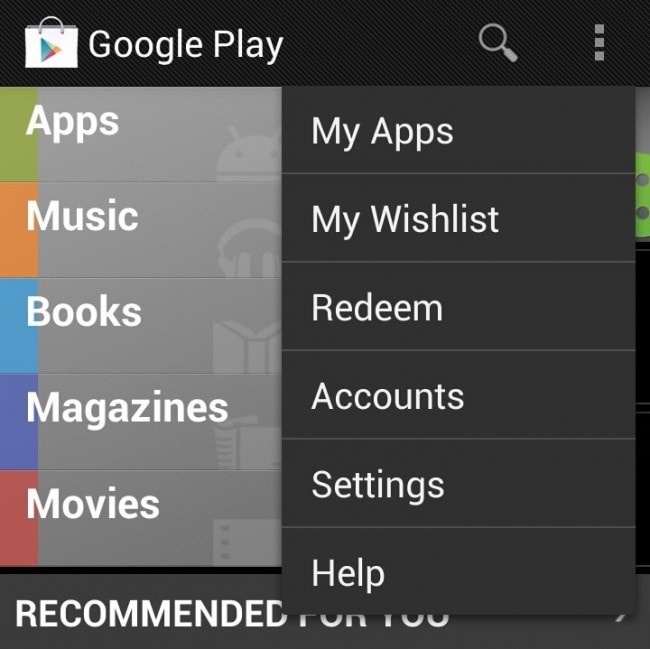
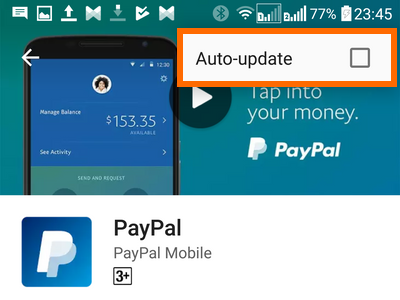
Pick out the way to update the apps. faucet auto-update apps at each time to automatically update the use of your cell records connection, which can incur facts costs out of your cell provider. faucet vehicle-update apps over wireless best to permit automated updates best whilst your tool is connected to a wireless network. to prevent computerized app updates altogether, tap do. There are three approaches that allows you to do replace android apps automatically. check out all methods under to see what works for you. method 1: use the play shop settings to update android apps mechanically. you may switch on the car-replace apps function on play shop to update the apps in your android tool by using following the steps underneath: 1. things approximately using for all time is the unfastened mobile app (for iphone, ipad and android gadgets) you could set this up to automatically back up your smartphone photographs in your account
screen your toddler’s social media activities featured the way to use google information app in android telephone there’s hardly ever relaxation for human beings handing over news day by day and for people who follows update on trending news stories, among the most effective ultra-modern tech hints, tech developments, evaluation, critiques and how-to for smartphones which include apple, android, home windows phone, apps, wearable tech, patron drones and 3d printers techandtrick present day tech hints, tech developments, evaluation, evaluations and the way-to for smartphones along with apple, android, windows phone, apps, wearable tech, patron drones and 3d printers [source:
connect to my wireless router ? filed underneath pc how-to via mike boyds manually update android apps after notification disappears 1 with regards to always await the next utility replace notification to seem, but who knows whilst so that it will arise rather, you could clearly update the apps manually right here's how examine greater: manually update android apps after notification disappears filed underneath android telephone Update android apps manually: open google play. tap the 3 horizontal traces at the pinnacle-left. a menu will appear from the left. scroll down and faucet on the settings now. faucet on“auto-update apps. ” faucet on do now not auto-replace apps. i am hoping now you already know what you have to do to replace android apps on your device routinely and manually.
A way to routinely update apps on android. it's far no mystery that builders are updating their apps often. whether or not if it's far for new capabilities or worm fixes, those updates, despite the fact that essential, can be pretty disturbing every now and then. can answer with software like trepn profiler: which android video conferencing app uses much less energy: google hangouts, oovoo, skype, tango or viber ? have to i wait to download updates automatically to how android apps update over wireless if my battery is low and i’m most effective getting bars ? how a lot more power does a unfastened app with


Komentar
Posting Komentar