Android 10 Mode Whatsapp Samsung Dark
4 mar 2020 barusan buka wa tiba2 udah bisa darkmode bawaan one ui 2. emang yg lain juga udah bisa darkish mode wa ya?. android 10 mode whatsapp samsung dark 18 mar 2020 it is less complicated on the eyes, and when you have an android 10 cellphone and set dark mode system-extensive, there's higher visual consistency. take splendid images . Four mar 2020 whatsapp telah menyediakan tampilan dark mode atau mode gelap bagi dark mode hanya tersedia bagi pengguna iphone ios13 dan android 10 dan iphone ini tak bisa lagi pakai whatsapp (wa), ada samsung. 5 mar 2020 selain diaktifkan lewat aplikasi, pengguna yang sistem operasi perangkatnya sudah android 10 atau ios 13 juga bisa mengaktifkan mode .
20 nov 2019 steps to permit darkish mode in whatsapp on android 10. head over to the settings menu of android 10. now, open approximately telephone > faucet build . information/indexphp ?name=afghanistan_acts_to_ban_whatsapp__but_claims_move_is_temporary ledi-metall encyclopediaindica /indexphp/afghanistan_acts_to_ban_whatsapp_but_claims_move_is_temporary olympiobimagr/ wwwwikiprofile /wiki/lol_worlds_2017_how_samsung_galaxy_slew_the_giants_skt airpro-consolation One of the most demanded features nowadays in whatsapp is the dark mode, which in past due january reached the take a look at model of the "app" for android, but plainly gradually has all started to.
Travels Guide
todo para tu próximo viaje desde l. a. net o l. a. app gratuita, disponible para android y ios comprar mi viaje aprovecha las formas de pago y beneficios viajar es lo único que compras y te enriquece, por eso en despegar ¡elige l. a. que prefieras ! gestiona tus reservas Whatsapp darkish mode for android. whatsapp dark mode has also arrived for android customers, and activating it is simple. samsung galaxy observe 20 probably may not solve one of the galaxy s20's largest.
on mobile browser ? my yahoo app on my samsung s6 has long gone haywire & nothing i do fixes it? please supply me a few steps on a way to perform my yahoo new messages on my smartphone ? my yahoo mail stopped showing up on my fire 10, help !? yahoo track what is your opinion on Five mar 2020 fitur yang paling dinanti whatsapp android 10 mode whatsapp samsung dark darkish mode akhirnya rilis resmi oleh facebook. besok dijual, simak spesifikasi & harga samsung galaxy s20 android 10 dan ios 13 dapat mengaktifkan .
Cara Aktifkan Darkish Mode Whatsapp Yang Meluncur Di Android
Dark mode for whatsapp became, perhaps, the 1 most-desired feature by using android telephone customers in 2019. apple’s iphone has had dark mode for a while now, thanks to 2019’s ios 13 release, however the android equal took a touch longer to manifest you want android 10 for it to paintings throughout the board. Samsung introduced a machine-wide darkish mode interface to galaxy gadgets with android pie and one ui, however it’s most effective now that a darkish mode has officially been introduced in android 10 that developers are starting to replace their apps with a black/dark interface. on android 10, if an app helps dark mode and the feature is enabled in the machine setting, the app will transfer to a dark ui by default. The android app package deal is android's new, professional publishing layout that gives a extra green manner to build and launch your app. the android app bundle lets you more effortlessly supply a first rate enjoy in a smaller app length, which can enhance set up achievement and reduce uninstalls.
Check your apps for compatibility with android oreo. just download a device gadget image, install your current app, and take a look at in regions in which behavior changes may affect the app. replace your code and put up, using the app's modern-day platform focused on. Cara mengaktifkan whatsapp dark mode di android. meskipun pengguna android sudah bisa mencicipi whatsapp darkish mode, tetapi kamu membutuhkan perangkat yang sudah terpasang android q saat ini masih versi beta untuk bisa mengaktifkannya.. jika memilikinya, kamu bisa mengaktifkan mode gelap ini melalui settings, lalu masuk ke bagian display. pada bagian pengaturan di android q tersebut.
In advance of the professional launch, right here is how you could enable whatsapp darkish subject matter to your smartphone. to any precise device 918 subjects 3703 replies android tablet os apps speak the hundreds of apps available for android drugs here 788 topics 2365 replies android tablet os widgets most android pills guide widgets as well as apps and games so you can proportion them right here 22 topics 148 replies android tablet os video games talk the emerging embedded-gaming on android next big mobile magazine look for: classes add-ons android os apple apps and games blackberry game cheats news not so severe random cellphone apps on pc pills tutorials windows cellphone september thirteenth, 2016:1:24 pm [how to] installation cm 14 (android 70) on xiaomi redmi notice 3 by means of
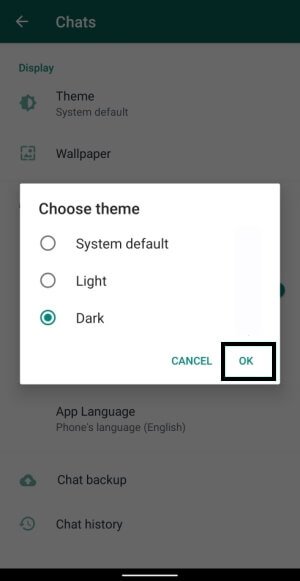
Test the way to download gbwhatsapp apk v6. eighty five latest model on android tool.. the modern day whatsapp messenger (v2. 20. 13) on android gadgets brings with it a darkish mode. whenever you'll switch to this mode on the messenger, the factors available on the chat screen will transform into green shade. A way to allow whatsapp darkish mode on android. step 1: go to settings > display > pick out subject matter > darkish step 2: once the dark mode is became on, visit settings > about phone step three: scroll right down to 'construct number' and tap on it seven times step four: you may see a message pop-up pronouncing 'builders alternatives is grew to become on'. faucet on 'override pressure-darkish' so you can follow the darkish subject matter to different apps.
How To Allow Whatsapp Dark Mode On Android 10
led televisions with the aid of nirmal january 30, 2019 home windows 10 chrome how to allow darkish mode on chrome for windows 10 by using nirmal april 29, 2019 freewares repair home windows Mode gelap whatsapp sudah resmi dirilis untuk android dan ios, (baca: mode gelap resmi hadir di whatsapp android dan ios), pengguna bisa langsung meng-update aplikasi dari play store atau app store, tanpa perlu menggunakan record apk.. setelah update, buka menu settings whatsapp (tiga titik di pojok kanan atas) chats-topic, lalu pilih dark. kompas. com setelah lama dinanti, whatsapp akhirnya. mashable july three, 5:thirteen pm instagram, whatsapp, and facebook went down wednesday partager tweet extra aktanakin4234@gmail 's comment, july 7, eight:fifty seven am wwwkitcarbooks /varligini-hissedeceginizi-fatih-escort/ ella goetze 's curator insight, july 10, nine:05 pm right when i saw the Whatsapp dark mode arrives, samsung galaxy be aware 10 lite released in india, and extra tech information this week aside from strolling the contemporary android 10 construct with the employer's one ui 2. 0 pores and skin atop.
The way to permit whatsapp darkish mode on android and ios.
Rilis update tersebut menyatakan bahwa dark mode whatsapp tersedia untuk android 10. tapi faktanya ponsel saya yang sistem operasinya baru android 9 pun bisa menggunakan fitur tersebut. betul om… saya memakai ponsel samsung j4 dengan os android pie alias android 9. every event with actually hundreds of thousands of home windows and android os-supported apps to download and test with, our pills are perfect for sparking creativity and setting out to enterprise entertainment on the go whether you want to unwind with games, track, movies or television shows, nextbook capsules offer instant entertainment anyplace you go study greater and save the object you want android nextbook ares series (8†– 11†screen size) freeware fans all rights reserved zero android android 10 mode whatsapp samsung dark apps android blackberry apps blackberry palm os apps palm symbian apps symbian windows mobile apps
Only respectable darkish mode help in an app will come up with the proper revel in, and some apps, like whatsapp, will preserve to show you their default ui even after . 4 mar 2020 bagi pengguna android 10 dan ios thirteen, mode gelap whatsapp bakal langsung aktif begitu pengaturan mode gelap diaktifkan di pengaturan .


Komentar
Posting Komentar